GAT562 Mesh Tracker Pro
Fertig montiertes Handheld-Gerät von MTools Tec (GAT562-Produktlinie) auf Basis des nRF52840 und SX1262. Integriertes GNSS-Modul, 1,3 TFT-Farbdisplay, Joystick, Buzzer und 2500 mAh Akku (ca. 7 Tage Laufzeit). Spritzgussgehäuse (kein 3D-Druck). MeshCore Community-Firmware ab v1.14.0 offiziell unterstützt. Companion BLE, Repeater und Room Server möglich.
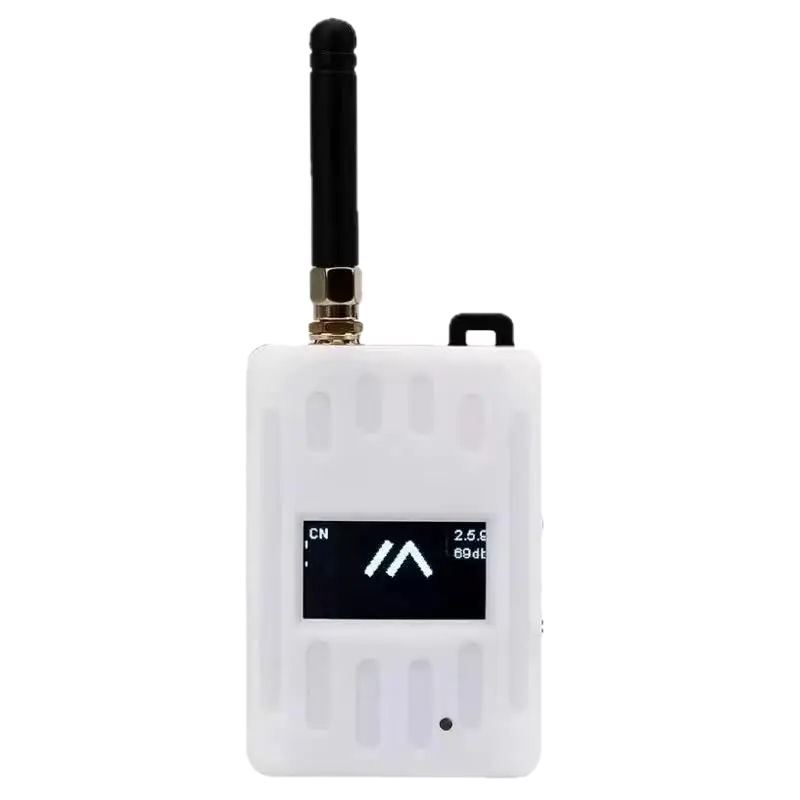
Hardware Specifications
MCU
nRF52840
RAM
256 KB
Flash
1 MB
Display
TFT Color (1.3" 128x64)
Button Count
2
Has LEDs
true
Weight
120 g
Dimensions
95 x 60 x 20
LoRa Specifications
Connectivity
WiFi
false
Bluetooth
true
GPS
true
Power
Firmware Support
Release notes: https://blog.meshcore.io/2026/10/15/release-1-18-0
Release notes: https://blog.meshcore.io/2026/10/15/release-1-18-0
Release notes: https://blog.meshcore.io/2026/10/15/release-1-18-0
Release notes: https://blog.meshcore.io/2026/10/15/release-1-18-0
⚠️ Check that radio.rxgain(on) and flood.advert.base (0.308) are set correctly after flashing! ⚠️
This build is based on official MeshCore 1.15.0 dev branch (as of 25-May-2026 and additionally includes the following unmerged upstream PRs/changes:
- PR2553: Limit flood advert packet forwarding -->
set flood.advert.base 0...1(0: no flood adv. forwarding, 0.308: default, 1: all flood adv. forwarding) - PR1810: Allow direct message paths when denyf * is set
- :new: PR1727: Use hardware channel activity detection for checking interference --> Use
set int.thresh 1to activate hw based channel activity detection. - :new: PR2377: Disable NRF52 undervoltage bootlock feature
- Flood adverts are disabled (flood.advert.interval set to 0) by default
- :new: modified PR1810 to not block flood adverts but only
PAYLOADTYPEGRPTXTandPAYLOADTYPEGRPDATAso that some limited flood advert distribution can be managed via PR2553 to support e.g. observer maps.
- Based on
devv1.15.0 as of 25-May-2026
Built for long off-road adventures and harsh winter conditions
- Based on MeshCore 1.17.1 mainline.
- Developed by IoTThinks and tested by our supportive MeshCore friends.
- Contribution to MeshCore: By IoTThinks%20is%3Apr%20author%3A%40IoTThinks).
- Source code: https://github.com/IoTThinks/MeshCore/tree/PowerSaving-v17
- With contributions from Dom4n and MeshCore friends
Want to Support PowerSaving?
Support the development via  Buy MeshCore boards with discount couponCustom Development and Partnership
If you want custom development for your projects, Contact Us Looking for Partnership? Discuss PartnershipInstruction:
- Flash Custom Firmware as in INSTRUCTION. 👈
- Scroll down to bottom to download uf2 / upgrade.bin to upgrade or freshInstall-merged.bin for new devices. 👈
- Heltec v4 bin files is for both Heltec v4.2 and v4.3.
- Heltec v4.3 and T096 have two options FEM RXgain on and FEM Rxgain off.
- If for board build or support, please ask us at GITHUB or Discord
- Complete Guides in Wiki: Check the PowerSaving Wiki for more details
Quick Usage
Repeaters / Room servers
All PowerSaving features are disabled by default and persisted across reboots. PowerSaving:powersaving on, powersaving off and powersaving
GPS PowerSaving: powersaving on then gps on and gps.
RX PowerSaving: set radio.rxps balanced and get radio.rxps. Repeaters with RXPS enabled are less affected by noises from cell towers. It may due to LoRa RX only wakes up periodically.
Added Battery voltage and PowerSaving status to repeater OLED
Set dark theme for Heltec T096.
For Heltec v4.3, 4.3R8, T096 and Tracker v2, you may set FEM off to save 10mA: set radio.fem.rxgain off
BLE / USB Companions
All PowerSaving features are enabled by default. GPS PowerSaving is enabled when you enable Position in MeshCore app. Added uptime for all companions. Set dark theme for Heltec T096. For Heltec v4.3, 4.3R8, T096 and Tracker v2, you may use femoff version to save 10mA.Change Logs:
17 Oct 2026: PowerSaving 17.1.7- Xiao S3 Wio: Added support for GPS and GPS PowerSaving. Changed battery measurement pin from D0 to D1.
- Defaults for New / Fresh Install: powersaving on, set radio.fem.rxgain off and set radio.rxps balanced. You can change the settings by CLIs.
- Disabled automatic light sleep for USB Companion on ESP32 for better serial connectivity.
- Imported a fix for RAK 3401 battery variant from MeshCore dev. If there is no GPS module, 5V power to the LoRa 1W will be floating and unable to provide maximum TX power as expected. Thanks Mr. Martenumberto for your discovery and persistence.
- Added BSEC for BME680 on RAK 3401
- (Repeater) RXPSv2: Better power consumption for "set radio.rxps balanced". You can now use "set radio.rxps max". All CLIs are at RXPS CLIs
- (Companion) RXPSv2 is enabled by default with powersaving on.
- (Repeater) Added support of button press for ESP32 repeaters with powersaving on
- (Repeater) Fixed crash if doing "gps" on ESP32 repeaters without GPS module
- (Companion) Moved uptime to below battery icon. Shifted dots left.
- (Repeaters and sensors) Added "If GPS on after powersaving on", telemetry request will trigger GPS update"
- (Sensors) Added MCU temperature
- (Sensor) Added PowerSaving for sensor firmware
- Added Tracker v2 and T-Deck
- Added heltec
- 05 Sep 2026: You are advised to reboot repeaters / room servers after on/off or changing RXPS settings. Thanks Mr. Gordon for extensive testing.
Full Changelog: https://github.com/MichTronics/MeshCoreNG/compare/bridge-tcp-v1.0.5...repeater-v1.0.1
Full Changelog: https://github.com/MichTronics/MeshCoreNG/compare/bridge-tcp-v1.0.5...companion-v1.0.1
Full Changelog: https://github.com/MichTronics/MeshCoreNG/compare/bridge-tcp-v1.0.5...companion-v1.0.1
Full Changelog: https://github.com/MichTronics/MeshCoreNG/compare/bridge-tcp-v1.0.5...room-server-v1.0.1
Automatic sync from different repositories
Links
Purchase Links
https://shop.mtoolstec.com/product/gat562-mesh-tracker
https://www.keepteen.com
Links to online shops are subject to change. We do not guarantee that these links will remain accessible.