Heltec WiFi LoRa 32 V3
A very popular ESP32-S3-based LoRa board with an SX1262 and an integrated 0.96" OLED display. Community firmware: Companion BLE/USB, Repeater, Room Server. The best balance of price, performance, and community support. 22 dBm transmit power.
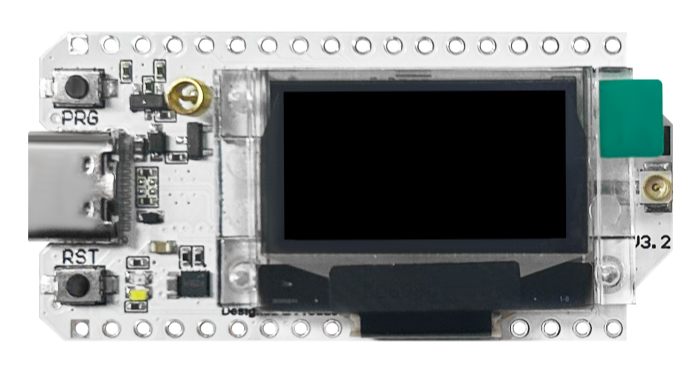
Hardware Specifications
MCU
ESP32-S3FN8
RAM
512 KB
Flash
8 MB
Display
OLED (0.96" 128x64)
Button Count
1
Has LEDs
true
Weight
12 g
Dimensions
51 x 26 x 11
LoRa Specifications
LoRa Chip
SX1262
Frequency Band
868 MHz, 915 MHz
Max. TX Power
22 dBm
Antenna Type
U.FL connector
Typical Range
15 km
Connectivity
WiFi
true
Bluetooth
true
GPS
false
Power
USB Type
Battery Connector
JST 1.25mm 2-pin
Solar Support
true
Power Consumption (Idle)
45 mA
Power Consumption (TX)
120 mA
Firmware Support
Release notes: https://blog.meshcore.io/2026/10/15/release-1-18-0
Release notes: https://blog.meshcore.io/2026/10/15/release-1-18-0
Release notes: https://blog.meshcore.io/2026/10/15/release-1-18-0
Release notes: https://blog.meshcore.io/2026/10/15/release-1-18-0
⚠️ Check that radio.rxgain(on) and flood.advert.base (0.308) are set correctly after flashing! ⚠️
This build is based on official MeshCore 1.15.0 dev branch (as of 25-May-2026 and additionally includes the following unmerged upstream PRs/changes:
- PR2553: Limit flood advert packet forwarding -->
set flood.advert.base 0...1(0: no flood adv. forwarding, 0.308: default, 1: all flood adv. forwarding) - PR1810: Allow direct message paths when denyf * is set
- :new: PR1727: Use hardware channel activity detection for checking interference --> Use
set int.thresh 1to activate hw based channel activity detection. - :new: PR2377: Disable NRF52 undervoltage bootlock feature
- Flood adverts are disabled (flood.advert.interval set to 0) by default
- :new: modified PR1810 to not block flood adverts but only
PAYLOADTYPEGRPTXTandPAYLOADTYPEGRPDATAso that some limited flood advert distribution can be managed via PR2553 to support e.g. observer maps.
- Based on
devv1.15.0 as of 25-May-2026
Built for long off-road adventures and harsh winter conditions
- Based on MeshCore 1.17.1 mainline.
- Developed by IoTThinks and tested by our supportive MeshCore friends.
- Contribution to MeshCore: By IoTThinks%20is%3Apr%20author%3A%40IoTThinks).
- Source code: https://github.com/IoTThinks/MeshCore/tree/PowerSaving-v17
- With contributions from Dom4n and MeshCore friends
Want to Support PowerSaving?
Support the development via  Buy MeshCore boards with discount couponCustom Development and Partnership
If you want custom development for your projects, Contact Us Looking for Partnership? Discuss PartnershipInstruction:
- Flash Custom Firmware as in INSTRUCTION. 👈
- Scroll down to bottom to download uf2 / upgrade.bin to upgrade or freshInstall-merged.bin for new devices. 👈
- Heltec v4 bin files is for both Heltec v4.2 and v4.3.
- Heltec v4.3 and T096 have two options FEM RXgain on and FEM Rxgain off.
- If for board build or support, please ask us at GITHUB or Discord
- Complete Guides in Wiki: Check the PowerSaving Wiki for more details
Quick Usage
Repeaters / Room servers
All PowerSaving features are disabled by default and persisted across reboots. PowerSaving:powersaving on, powersaving off and powersaving
GPS PowerSaving: powersaving on then gps on and gps.
RX PowerSaving: set radio.rxps balanced and get radio.rxps. Repeaters with RXPS enabled are less affected by noises from cell towers. It may due to LoRa RX only wakes up periodically.
Added Battery voltage and PowerSaving status to repeater OLED
Set dark theme for Heltec T096.
For Heltec v4.3, 4.3R8, T096 and Tracker v2, you may set FEM off to save 10mA: set radio.fem.rxgain off
BLE / USB Companions
All PowerSaving features are enabled by default. GPS PowerSaving is enabled when you enable Position in MeshCore app. Added uptime for all companions. Set dark theme for Heltec T096. For Heltec v4.3, 4.3R8, T096 and Tracker v2, you may use femoff version to save 10mA.Change Logs:
17 Oct 2026: PowerSaving 17.1.7- Xiao S3 Wio: Added support for GPS and GPS PowerSaving. Changed battery measurement pin from D0 to D1.
- Defaults for New / Fresh Install: powersaving on, set radio.fem.rxgain off and set radio.rxps balanced. You can change the settings by CLIs.
- Disabled automatic light sleep for USB Companion on ESP32 for better serial connectivity.
- Imported a fix for RAK 3401 battery variant from MeshCore dev. If there is no GPS module, 5V power to the LoRa 1W will be floating and unable to provide maximum TX power as expected. Thanks Mr. Martenumberto for your discovery and persistence.
- Added BSEC for BME680 on RAK 3401
- (Repeater) RXPSv2: Better power consumption for "set radio.rxps balanced". You can now use "set radio.rxps max". All CLIs are at RXPS CLIs
- (Companion) RXPSv2 is enabled by default with powersaving on.
- (Repeater) Added support of button press for ESP32 repeaters with powersaving on
- (Repeater) Fixed crash if doing "gps" on ESP32 repeaters without GPS module
- (Companion) Moved uptime to below battery icon. Shifted dots left.
- (Repeaters and sensors) Added "If GPS on after powersaving on", telemetry request will trigger GPS update"
- (Sensors) Added MCU temperature
- (Sensor) Added PowerSaving for sensor firmware
- Added Tracker v2 and T-Deck
- Added heltec
- 05 Sep 2026: You are advised to reboot repeaters / room servers after on/off or changing RXPS settings. Thanks Mr. Gordon for extensive testing.
v1.16_0607
- Companion UI: Native multilingual display on Heltec T096 (ST7735S)
Latin-based: Catalan, Croatian, Czech, Danish, Dutch, Estonian, Finnish, French, German, Hungarian, Icelandic, Italian, Latvian, Lithuanian, Maltese, Norwegian, Polish, Portuguese, Romanian, Slovak, Slovenian, Spanish, Swedish, Turkish, Vietnamese, Welsh
Cyrillic: Belarusian, Bulgarian, Macedonian, Russian, Serbian, Ukrainian
Greek: Greek
- Companion UI: Contacts screen now includes room servers; request telemetry from any contact.
[R]. Selecting any contact — chat node or room server — and long pressing opens an action menu: Send message or Request telemetry. Requesting telemetry displays the node's battery voltage and GPS coordinates (if present); long press to open the GPS Trace screen for that location.
GPS coordinates follow the Pos. Format selected in Settings (DD, UTM, or MGRS).
The message inbox group list now tags group/channel entries with [G] and room server entries with [R] for consistent visual distinction. Each room message shows the original author's name. When viewing a room message, long press to open the popup and select Reply to post back to the room (visible to all subscribers).
> Private room servers: messaging requires a prior login. Public rooms (no password) work without any login. For private rooms, log in once via the MeshCore app — if your account has admin rights on that room server, the session persists across reboots. Regular user sessions are not saved to flash and will require re-login after the room server reboots.
- Companion: switch the app connection between BLE and USB serial without reflashing.
usb build — the PC app connects over the USB serial port directly. Toggle via Settings → Connection Mode on the display, or via TerminalCLI: set conn.mode usb / set conn.mode ble. The setting persists across reboots. BLE toggle is hidden in the Settings menu while USB mode is active.
- Repeater, Room Sever: hold user button 5 seconds to power off.
- Repeater, Room Server:
advert.hops.maxdefault changed to 8; room server support added;flood.max.advertalias.
advert.hops.max now defaults to 8 instead of flood.max — advert relay limiting is active out of the box without any configuration. Room servers now also enforce this limit (previously repeater-only). The command flood.max.advert is accepted as an alias for compatibility with upstream firmware.
v1.181031
- New: most of what the app sets can now be done on the node. (Companion)
- Contacts: favourites, Remove contact, Reset path, Share contact, and a person's Permissions (Telemetry, Location, Environment, Remote CLI). See [Display Guide](CompanionDisplayGuide.md#contact-action-screen).
- Channels: + Add channel at the end of the conversation list (Public, and with the CardKB hashtag and private channels), Share and Invite in a channel's menu, Join channel on a received invite and Join #sos on a message naming a hashtag channel. See [Display Guide](CompanionDisplayGuide.md#channels).
- Settings: now in groups, with Auto-add and the telemetry settings added. Changes are saved when you leave Settings. See [Display Guide](CompanionDisplayGuide.md#settings-page).
- TerminalCLI: commands for the rest (auto-add, telemetry, position, flood scope, radio tuning,
erase), and TerminalCLI in a person's menu for a node that allows you Remote CLI. See [Companion TerminalCLI Commands](CompanionTerminalCLICommands.md).
- New: warning before messages or contacts run out of room. (Companion)
- New: radio presets on the node. (Companion)
set radio.custom.<N>; the header shows the selected one's frequency, bandwidth, SF and CR, and long press uses it. TX power stays as it is; Settings → Radio → TX Power picks it from a list in 3 dB steps. The config portal has the same Preset list in its Radio section and a Custom Radio Presets section for C1 to C5, which are included in backup/restore. See [Display Guide](CompanionDisplayGuide.md#radio-preset-screen).
- Changed: the Radio page shows the link instead of the settings. (Companion)
- New: GPS interval and mode on the node. (Companion)
Always, 30s up to 1h) and Mode (which satellite systems are used). Mode is shown only when the GPS takes it: the built-in GPS of boards such as Heltec V4 and T096, or an ATGM336H on the GPS header. See [Display Guide](CompanionDisplayGuide.md#gps-page-optional).
- Changed: the HT-CT62 keeps up to 250 contacts (was 350). (Companion, HT-CT62)
- New: LoRa radio off. (Companion)
radio off; an icon in the Home header shows it, and a restart turns the radio back on.
- New: repeater and room server tools. (Companion)
- New: sensor contacts. (Companion)
- New: Refresh Frequency for e-ink screens. (Companion, e-ink)
1, 5, 10 (default), 15 or 30. Leaving Settings no longer does a full refresh of its own; opening the CardKB message composer does one. Switching pages is also faster.
- Fix: text on e-ink screens faded. (Companion, Repeater, Room Server — E213, E290, Wireless Paper)
- New: type messages in other languages with the CardKB. (Companion)
Large to see accents and non-Latin letters. See [Display Guide](CompanionDisplayGuide.md#typing-in-other-languages).
- New: Delete all messages. (Companion)
- Fix: the app got no reply to CLI commands once the node's message store was full. (Companion)
Full Changelog: https://github.com/MichTronics/MeshCoreNG/compare/bridge-tcp-v1.0.5...repeater-v1.0.1
Full Changelog: https://github.com/MichTronics/MeshCoreNG/compare/bridge-tcp-v1.0.5...companion-v1.0.1
Full Changelog: https://github.com/MichTronics/MeshCoreNG/compare/bridge-tcp-v1.0.5...companion-v1.0.1
Full Changelog: https://github.com/MichTronics/MeshCoreNG/compare/bridge-tcp-v1.0.5...room-server-v1.0.1
Automatic sync from different repositories
Links
Purchase Links
https://heltec.org/project/wifi-lora-32-v3/
https://www.aliexpress.com/item/1005004513061474.html
https://www.amazon.de/dp/B0BVCHP84T
Links to online shops are subject to change. We do not guarantee that these links will remain accessible.