MeshCore in Saxony
Off-grid LoRa communication without the Internet
What is MeshCore?
MeshCore is a cross-platform system that enables text communication using standard LoRa radios. It is a system that offers 100% network-independent communication and is ideal for emergencies, outdoor activities, or simply for those who want an alternative means of communication when conventional networks fail.
Resilience
What makes MeshCore so special?
MeshCore operates exclusively using radio frequencies (RF), making it a practical and effective solution for communication. Because it uses RF, it does not rely on the Internet or cellular networks, making communication possible even in remote areas or during emergencies. This makes MeshCore a truly network-independent system.
Security
Secure* Communication!
Security and privacy are important aspects of MeshCore. Direct messages between two users are transmitted in encrypted form, so they cannot be easily read by third parties. However, this does not apply to all forms of communication—in particular, channel messages (floods) are not end-to-end encrypted (*). Users should be aware of these limitations, especially when exchanging sensitive information.
Efficiency
What are the main components?
A MeshCore network consists of several key elements that work together to enable effective communication. The main components include repeaters, which extend the network’s range, and companions—the devices users use to send and receive messages. There are also room servers, which serve as forums where users can exchange messages and content.
Versatile
Use Cases for MeshCore
MeshCore is extremely versatile and can be used in a variety of situations. Among its most important applications is communication in remote areas where there is no access to the Internet or telecommunications, such as during outdoor activities, expeditions, or camping. It is a valuable tool in emergencies and disaster relief, where communication is of critical importance.
Features
What do you need to get started with MeshCore?
MeshCore is available on a wide variety of LoRa devices. Depending on its intended use within the network, each device can run different types of firmware.
A current list of supported devices can be found at https://meshcore.io/flasher.
LoRa devices are available in various frequency bands (433 MHz, 868 MHz, and 915 MHz). In Germany, the 868 MHz band is currently the most widely used.
Nano G2 Ultra
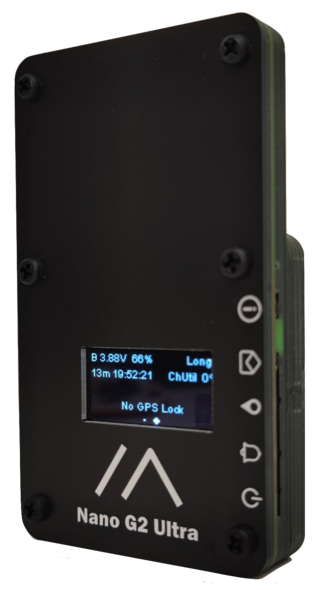
Ultra-portable, pocket-sized nRF52840 device from Unit Engineering (B&Q Consulting). Integrated broadband LoRa antenna (815–940 MHz), ATGM336H-5N GPS…
Heltec Mesh Solar
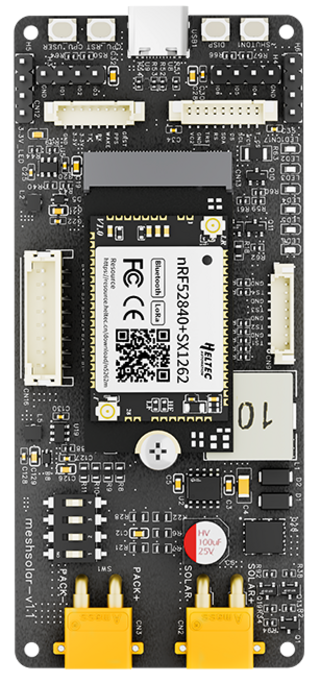
Solar-optimized repeater node from Heltec based on the nRF52840 with SX1262. Specifically designed for solar operation and permanent outdoor…
Heltec CT62 (Capsule Sensor)
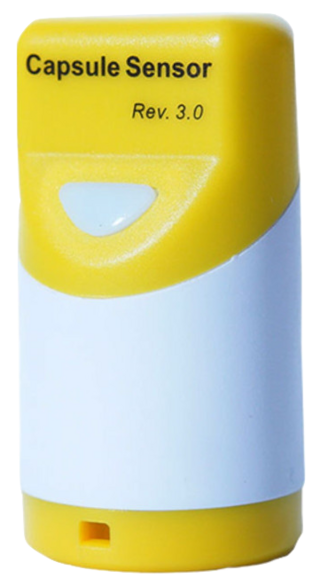
Ultra-compact Stamp module from Heltec based on the ESP32-C3 and SX1262. Only 10 µA deep sleep current. Intended as a development module (soldering…
Firmware
What firmware do you need to get started?
BLE Companion
Wireless Connection Mobile App Easy Setup
The BLE Companion connects via Bluetooth to Android or iOS devices running the MeshCore app. This allows you to actively participate in the MeshCore network and communicate with other users. The perfect companion for on the go.
USB Serial Companion
USB Connection Web Client (Multiplatform)
A USB Serial Companion is connected to computers or mobile devices via a USB cable. You can then communicate within the MeshCore network using a web interface, similar to the mobile apps.
Repeater
Greater Range, Intelligent Routing, Remote Administration
Repeaters extend the range of the MeshCore network by intelligently routing packets to the destination device. Unlike other LoRa mesh systems, not all received packets are retransmitted. Repeaters can be controlled remotely via a companion device using the MeshCore app.
Room Server
Message Storage Message History
Room servers provide simple BBS servers for exchanging messages with a history. They store messages and send them to users, allowing mobile users to return later to view the history. When a companion connects, it receives the last 32 unread messages.
Important Note Regarding Room Servers
Although a Room Server can also function as a repeater (using the “set repeat on” command), this is neither recommended nor supported. A Room Server with the repeat function enabled does not have the full set of repeater and remote maintenance features, which are only available in the repeater firmware. It is recommended to run the repeater and Room Server on separate devices to achieve optimal results.
Installation & Configuration
Here's how to configure your MeshCore devices.
The configuration process is simple and straightforward and consists of three main steps.
1. Web Flasher
Use the official Web Flasher to install the firmware on your device. Select the correct model and the desired firmware type (Client, Repeater, or Room Server).
Useful Links:
2. MeshCore App
Configure the final parameters using the MeshCore app. Available for Android on the Google Play Store and for iOS on the App Store.
Useful links:
3. LoRa Parameters
Set the specific parameters for the region according to the selected frequency band. Check the network coverage map to select the best band for the region.
Useful Links: