Using Regions and Scopes in the Companion App

In version 1.10.0, MeshCore introduced “region-based scoping” to limit packet distribution to specific geographic or logical areas, thereby reducing network congestion in large networks. But how can you use regions or scopes in the Companion App?

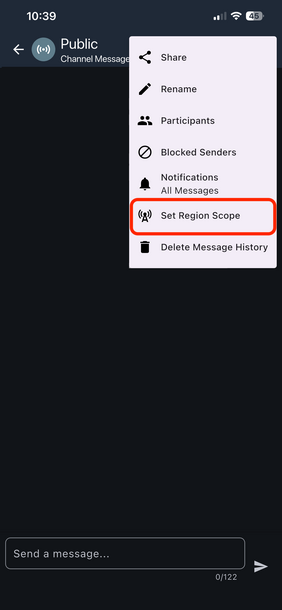
[Translate to English:] Schritt 1: "Set Region Scope" im Menü öffnen

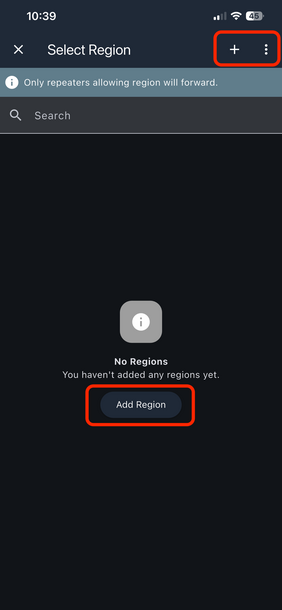
[Translate to English:] Schritt 2: Region von Hand oder per Abfrage hinzufügen

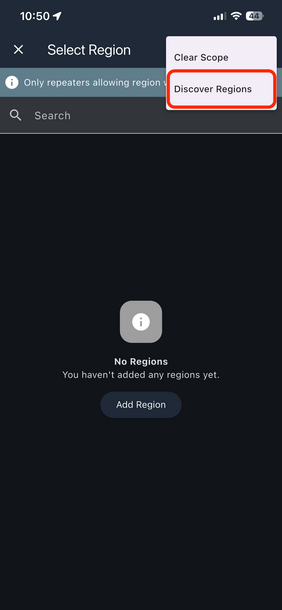
[Translate to English:] Schritt 3: Region mittels "Discover Regions" abfragen

As described here under "Regions and Scopes," regions and scopes are used to manage the flood of packets. 

Starting with app version 1.39.0, regions can be easily queried and used in the Companion App (provided that nearby repeaters have configured them).

To do this, simply open the “3-dot” menu in a channel (or in Public). Here, you can view the regions—either manually or by querying nearby repeaters—and add them to the Companion App.

After a quick search of the 0-hop repeaters, the available regions are displayed and can be added by clicking “Add.”

Further information: https://meshcore-de.fyi/meshcore:allgemeines:regions:basis

More News

Anyone familiar with the MeshCore ecosystem knows the concept: small LoRa radio devices that connect to form a mesh network without needing cellular…

Read more

An internal conflict is rocking the open-source project MeshCore: Disagreements over AI-generated code and a trademark application filed in secret…

Read more

An astonishingly vibrant ecosystem of smartphone clients has emerged around the open LoRa mesh protocol, MeshCore, within just one year. Three of…

Read more